Process
Paul Mullen
Fàilte: What a Ceramics Template Has to Do with Property Sites
Most Framer templates prioritise aesthetics. Fàilte prioritises behaviour. The difference matters more than it seems.
Fàilte started as a brief I set myself: build a template that could handle a real product catalogue without the filtering falling apart. That sounds modest. In practice, it meant solving a problem that most Framer templates either sidestep entirely or handle badly enough that it quietly breaks the experience for anyone with more than a handful of products.
The problem is faceted filtering. And the way most templates handle it is to hide products when a filter is selected, leave the other filter options unchanged, and let the user figure out why combining two filters returns nothing. No warning. No guidance. Just an empty page.
Fàilte started as a brief I set myself: build a template that could handle a real product catalogue without the filtering falling apart. That sounds modest. In practice, it meant solving a problem that most Framer templates either sidestep entirely or handle badly enough that it quietly breaks the experience for anyone with more than a handful of products.
The problem is faceted filtering. And the way most templates handle it is to hide products when a filter is selected, leave the other filter options unchanged, and let the user figure out why combining two filters returns nothing. No warning. No guidance. Just an empty page.
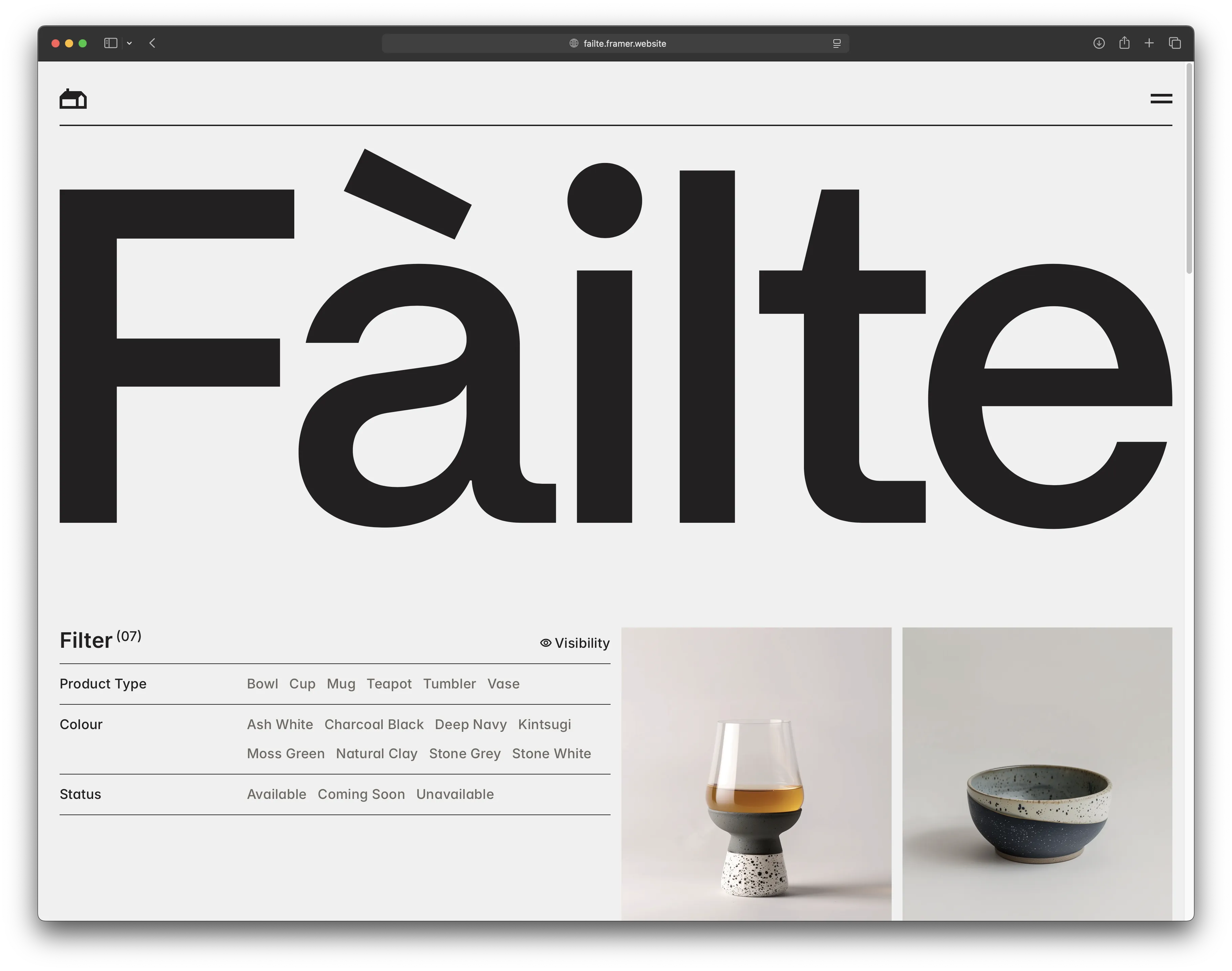
The Fàilte template products page showing the full filter panel with Product Type, Colour, and Status categories, alongside a grid of ceramic products.
The filter problem
Most catalogue-style websites have a version of this issue. You select a category, then a colour, and the product grid goes blank. Nothing in that combination exists, but the filters didn’t tell you that. You’re left wondering whether the site is broken or whether the product you wanted isn’t there.
The solution is usually called cascading or faceted filtering, and it’s common in more complex e-commerce environments. The idea is that selecting one filter should update all the other filters to reflect what’s still possible. If you pick a product type that only comes in two colours, the other colours should become unavailable rather than staying active and leading you nowhere.
Building that in Framer, driven by CMS content, without requiring any code editing from the buyer, took some working out. The system in Fàilte uses three code overrides. The first reads the full product list from the CMS and builds a live map of which filter combinations are valid. The second applies that map to the filter UI in real time, dimming, striking through and turning off any option that would return zero results. The third handles the product grid itself, showing only items that match the active selection.
The assumption built into most filtering systems is that the user will start with the broadest category and narrow down. But that’s the designer’s journey, not necessarily the visitor’s. Someone who already knows they want something in a specific colour, or only wants to browse what’s available right now, shouldn’t have to begin somewhere else to get there.
The filters in Fàilte don’t assume a starting point. Select a colour first, and the product types and availability that don’t match will dim. Select a status first, and the available colours and types respond accordingly. The logic runs in every direction, which means a visitor who only wants blue pieces can start there and narrow from that point, rather than being forced through a type-first hierarchy.
The result is that the filters always reflect what’s actually available. You cannot select a dead-end combination.
The filter problem
Most catalogue-style websites have a version of this issue. You select a category, then a colour, and the product grid goes blank. Nothing in that combination exists, but the filters didn’t tell you that. You’re left wondering whether the site is broken or whether the product you wanted isn’t there.
The solution is usually called cascading or faceted filtering, and it’s common in more complex e-commerce environments. The idea is that selecting one filter should update all the other filters to reflect what’s still possible. If you pick a product type that only comes in two colours, the other colours should become unavailable rather than staying active and leading you nowhere.
Building that in Framer, driven by CMS content, without requiring any code editing from the buyer, took some working out. The system in Fàilte uses three code overrides. The first reads the full product list from the CMS and builds a live map of which filter combinations are valid. The second applies that map to the filter UI in real time, dimming, striking through and turning off any option that would return zero results. The third handles the product grid itself, showing only items that match the active selection.
The assumption built into most filtering systems is that the user will start with the broadest category and narrow down. But that’s the designer’s journey, not necessarily the visitor’s. Someone who already knows they want something in a specific colour, or only wants to browse what’s available right now, shouldn’t have to begin somewhere else to get there.
The filters in Fàilte don’t assume a starting point. Select a colour first, and the product types and availability that don’t match will dim. Select a status first, and the available colours and types respond accordingly. The logic runs in every direction, which means a visitor who only wants blue pieces can start there and narrow from that point, rather than being forced through a type-first hierarchy.
The result is that the filters always reflect what’s actually available. You cannot select a dead-end combination.
FIG. 01
How standard filtering and Fàilte filtering handle the same selection
Standard filtering
PRODUCT TYPE
Tumbler selected
FILTER - ALL OPTIONS SHOWN
Colour
Blue
Green
Red
STATUS
Available
Coming soon
Selected
Green + Available
No products found
No explanation given
Dead end. User leaves.
Fàilte filtering
PRODUCT TYPE
Tumbler selected
FILTER - VALID OPTIONS SHOWN
Colour
Blue
Green
Red
STATUS
Available
Coming soon
Selected
Blue + Coming soon
Products shown
Only valid options offered
No dead ends. User continues.
FIG. 01
How standard filtering and Fàilte filtering handle the same selection
Standard filtering
PRODUCT TYPE
Tumbler selected
FILTER - ALL OPTIONS SHOWN
Colour
Blue
Green
Red
STATUS
Available
Coming soon
Selected
Green + Available
No products found
No explanation given
Dead end. User leaves.
Fàilte filtering
PRODUCT TYPE
Tumbler selected
FILTER - VALID OPTIONS SHOWN
Colour
Blue
Green
Red
STATUS
Available
Coming soon
Selected
Blue + Coming soon
Products shown
Only valid options offered
No dead ends. User continues.
Built for catalogues, not just ceramics
Fàilte ships as a ceramics studio. Calm typography, restrained colour palette, photography-led product pages, a fictional brand rooted in the Scottish Highlands. It felt like the right context: a small, considered maker with a limited catalogue and a specific audience. The kind of brand where the browsing experience should feel as deliberate as its products.
But the filtering mechanism underneath is entirely content-agnostic. The three overrides don’t know they’re filtering ceramics. They read from whatever CMS fields you give them, three categories, each with its own set of options, and they apply the same logic regardless of what those categories contain.
The same system works for a property site filtering by bedrooms, price band, and availability. It works for a furniture catalogue filtering by material, size, and lead time. It works for a restaurant menu filtering by dietary requirements and course. Anywhere a visitor needs to narrow down a list without hitting dead ends, the mechanism applies.
I’m currently running a test of exactly that. A Framer AI agent is rebuilding Fàilte as a property site, keeping the filtering logic intact and replacing the ceramics content with property listings. It’s early, and I’ll write more about what that process actually looks like once I have something to show. But the point is that the template was designed to make that kind of adaptation possible, not just technically, but structurally.
Built for catalogues, not just ceramics
Fàilte ships as a ceramics studio. Calm typography, restrained colour palette, photography-led product pages, a fictional brand rooted in the Scottish Highlands. It felt like the right context: a small, considered maker with a limited catalogue and a specific audience. The kind of brand where the browsing experience should feel as deliberate as its products.
But the filtering mechanism underneath is entirely content-agnostic. The three overrides don’t know they’re filtering ceramics. They read from whatever CMS fields you give them, three categories, each with its own set of options, and they apply the same logic regardless of what those categories contain.
The same system works for a property site filtering by bedrooms, price band, and availability. It works for a furniture catalogue filtering by material, size, and lead time. It works for a restaurant menu filtering by dietary requirements and course. Anywhere a visitor needs to narrow down a list without hitting dead ends, the mechanism applies.
I’m currently running a test of exactly that. A Framer AI agent is rebuilding Fàilte as a property site, keeping the filtering logic intact and replacing the ceramics content with property listings. It’s early, and I’ll write more about what that process actually looks like once I have something to show. But the point is that the template was designed to make that kind of adaptation possible, not just technically, but structurally.
What else is in the build
Alongside the filtering system, Fàilte includes a full multi-page site: homepage, product catalogue, product detail pages, journal, about and contact. Nine CMS collections cover everything from individual products and filter options to navigation items and brand details. Populate the collections, and the site largely builds itself around your content.
What else is in the build
Alongside the filtering system, Fàilte includes a full multi-page site: homepage, product catalogue, product detail pages, journal, about and contact. Nine CMS collections cover everything from individual products and filter options to navigation items and brand details. Populate the collections, and the site largely builds itself around your content.
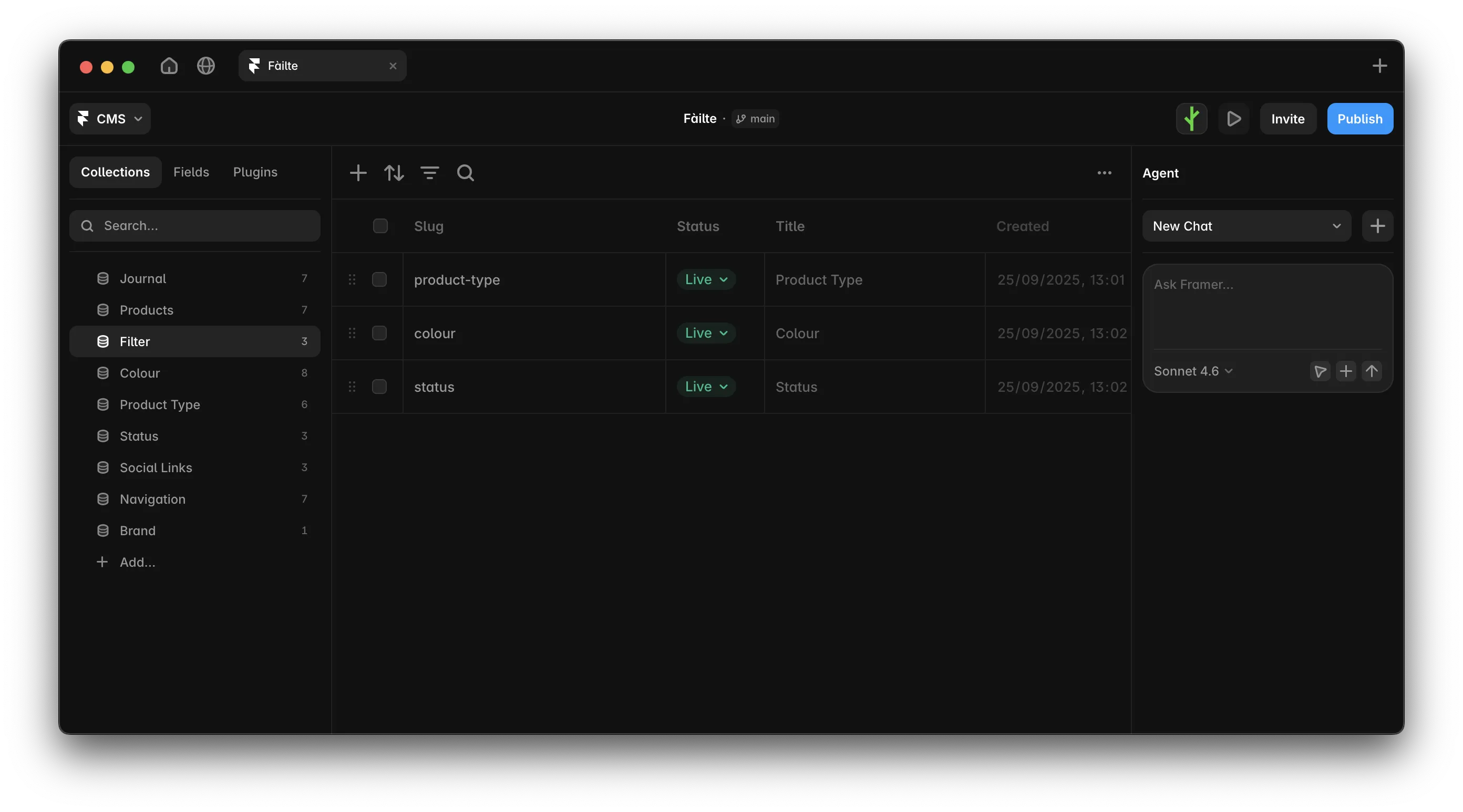
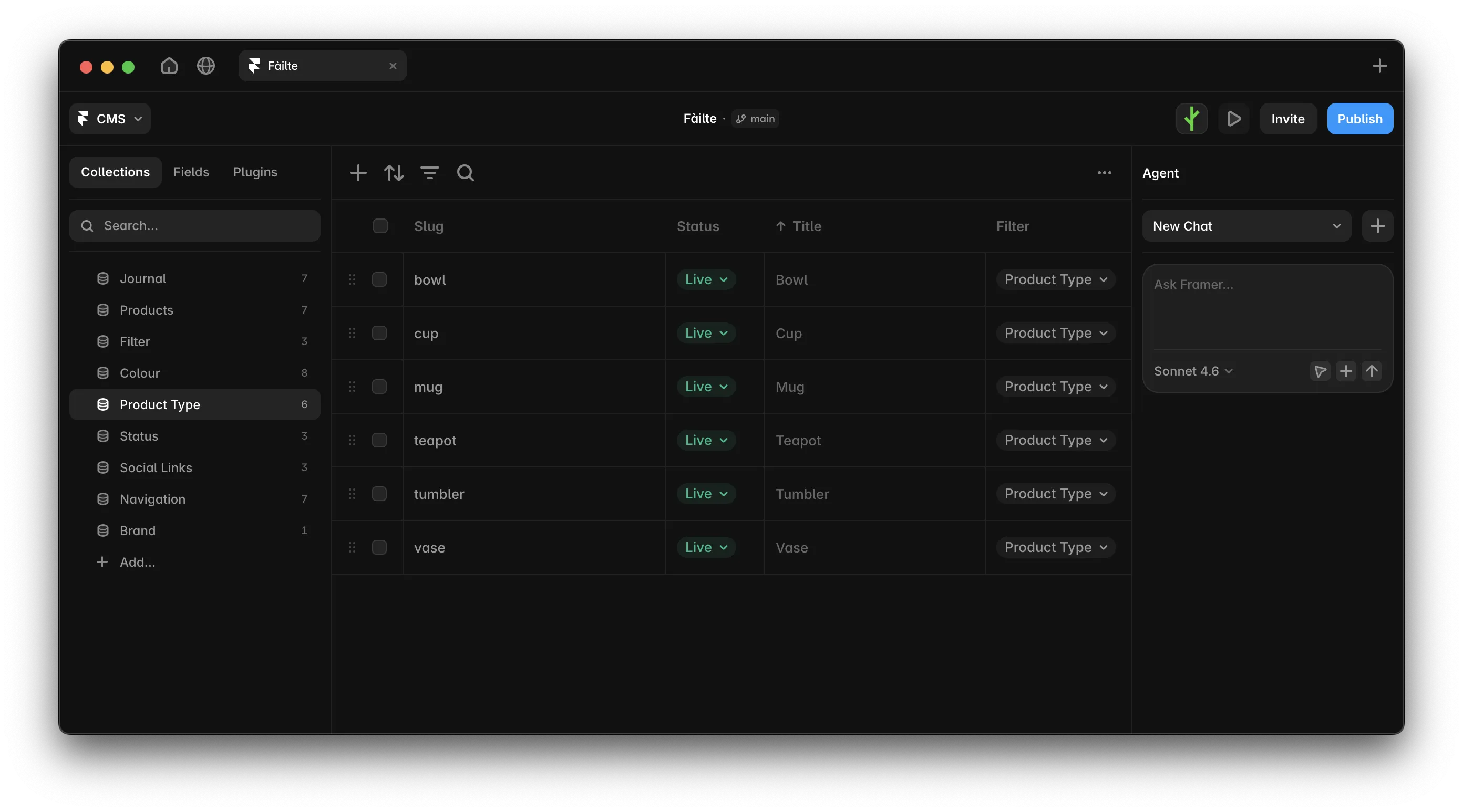
The filter system is driven entirely by three CMS collections: Product Type, Colour, and Status. Each item in these collections becomes a filter option on the front end. Add a new colour to the Colour collection, and it automatically appears in the filter. No code changes required.


There’s a live weather widget in the footer, driven by the studio’s coordinates. A small detail, but one that grounds the template in a specific place, which felt right for the brand it was designed for, and which is easy enough to remove or repurpose.
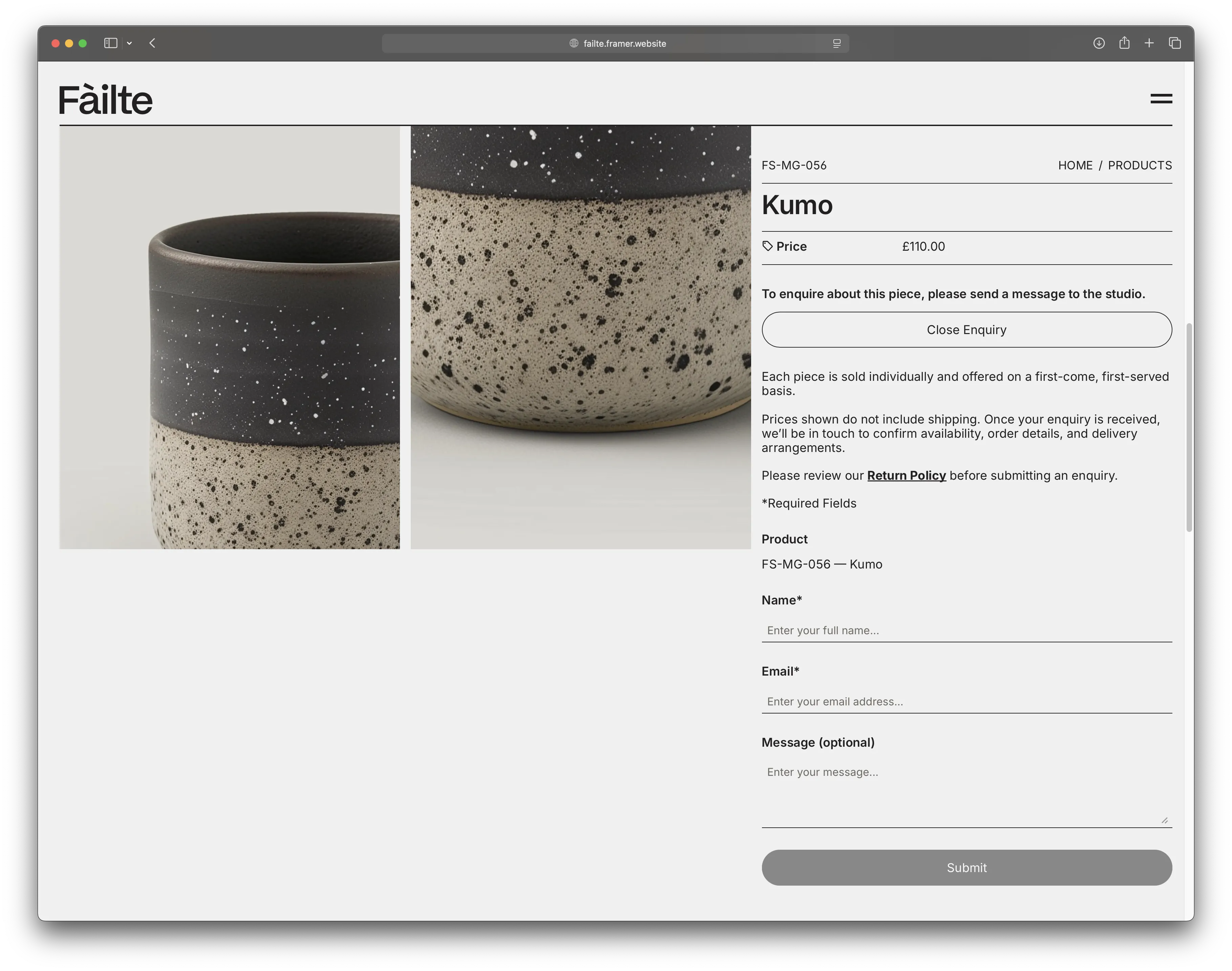
Product pages use an enquiry-based contact flow rather than a direct purchase path. That decision was deliberate. Made-to-order work, limited-run pieces, and appointment-based businesses, these contexts don’t suit a standard add-to-cart model. The template is built for them.
There’s also a written guide in the journal that covers every CMS collection, how the filtering system is wired, and how to add new filter categories without touching the override code.
There’s a live weather widget in the footer, driven by the studio’s coordinates. A small detail, but one that grounds the template in a specific place, which felt right for the brand it was designed for, and which is easy enough to remove or repurpose.
Product pages use an enquiry-based contact flow rather than a direct purchase path. That decision was deliberate. Made-to-order work, limited-run pieces, and appointment-based businesses, these contexts don’t suit a standard add-to-cart model. The template is built for them.
There’s also a written guide in the journal that covers every CMS collection, how the filtering system is wired, and how to add new filter categories without touching the override code.

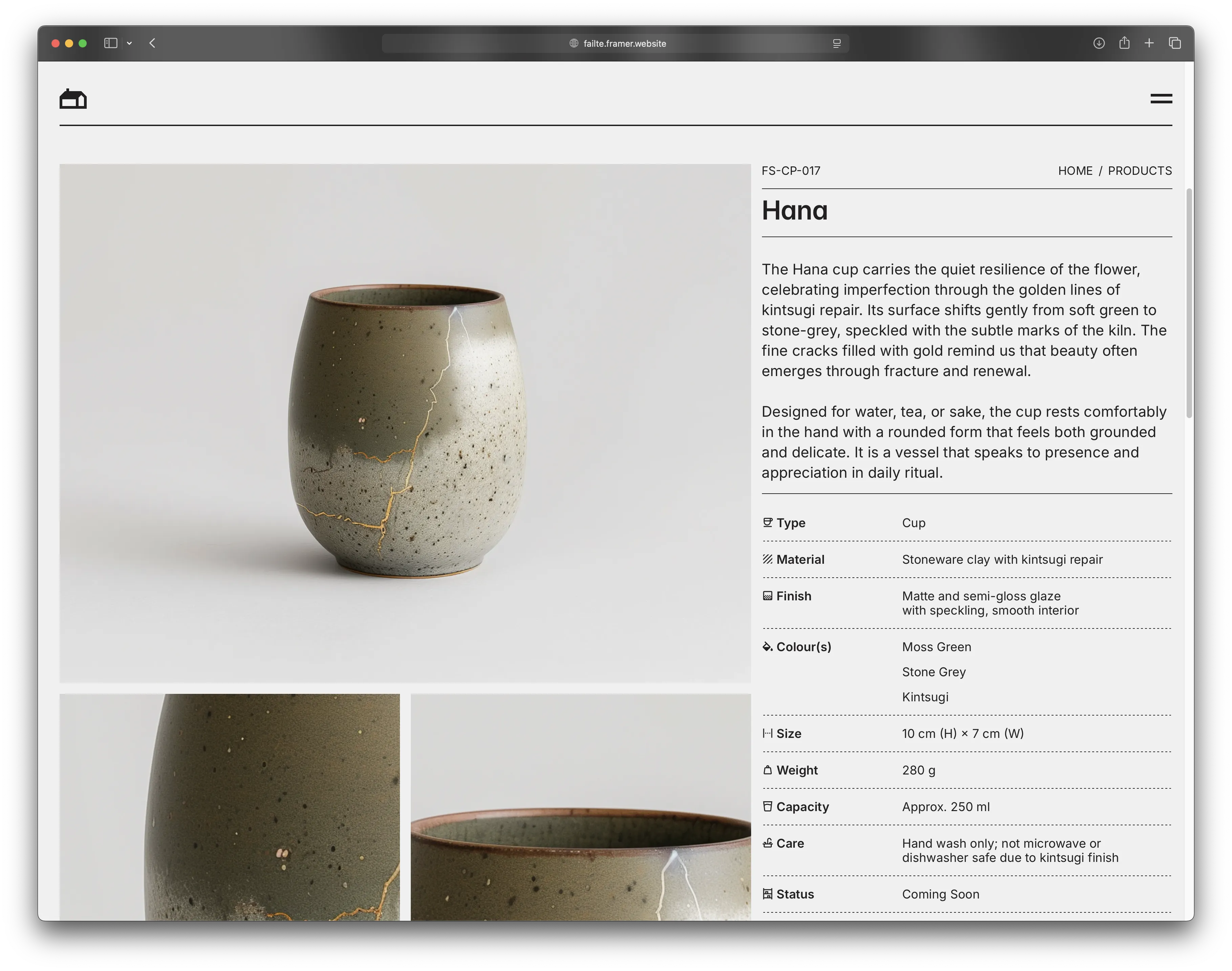
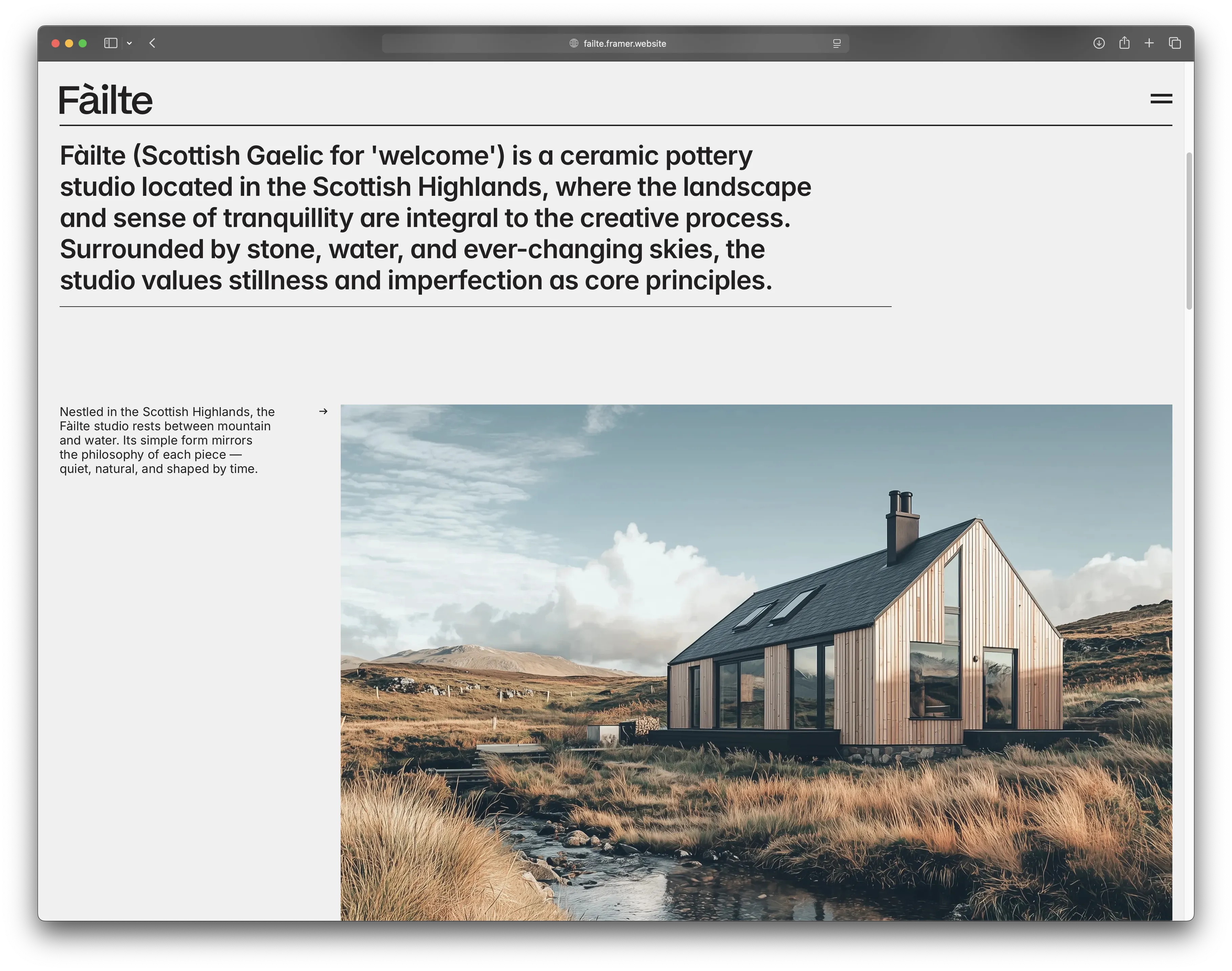
The footer, with its live weather widget driven by the studio’s coordinates. The product detail page, with the enquiry-based contact flow built in.
On templates and the work they represent
I build templates because the problems they solve are worth solving properly. The filtering logic in Fàilte isn’t a workaround. It’s a working system, built the way it would be built for a client, and packaged so that other Framer developers and designers don’t have to build it themselves.
That’s the version of template work that interests me. Not a layout with placeholder images, but something with genuine functional thinking underneath it. The aesthetic is there to show what’s possible with the mechanism, not to be the point of the thing.
On templates and the work they represent
I build templates because the problems they solve are worth solving properly. The filtering logic in Fàilte isn’t a workaround. It’s a working system, built the way it would be built for a client, and packaged so that other Framer developers and designers don’t have to build it themselves.
That’s the version of template work that interests me. Not a layout with placeholder images, but something with genuine functional thinking underneath it. The aesthetic is there to show what’s possible with the mechanism, not to be the point of the thing.
Fàilte is available now on the Framer Marketplace. You can browse the demo site before buying, and the full template is available here.
Fàilte is available now on the Framer Marketplace. You can browse the demo site before buying, and the full template is available here.
Fàilte started as a brief I set myself: build a template that could handle a real product catalogue without the filtering falling apart. That sounds modest. In practice, it meant solving a problem that most Framer templates either sidestep entirely or handle badly enough that it quietly breaks the experience for anyone with more than a handful of products.
The problem is faceted filtering. And the way most templates handle it is to hide products when a filter is selected, leave the other filter options unchanged, and let the user figure out why combining two filters returns nothing. No warning. No guidance. Just an empty page.
The Fàilte template products page showing the full filter panel with Product Type, Colour, and Status categories, alongside a grid of ceramic products.
The filter problem
Most catalogue-style websites have a version of this issue. You select a category, then a colour, and the product grid goes blank. Nothing in that combination exists, but the filters didn’t tell you that. You’re left wondering whether the site is broken or whether the product you wanted isn’t there.
The solution is usually called cascading or faceted filtering, and it’s common in more complex e-commerce environments. The idea is that selecting one filter should update all the other filters to reflect what’s still possible. If you pick a product type that only comes in two colours, the other colours should become unavailable rather than staying active and leading you nowhere.
Building that in Framer, driven by CMS content, without requiring any code editing from the buyer, took some working out. The system in Fàilte uses three code overrides. The first reads the full product list from the CMS and builds a live map of which filter combinations are valid. The second applies that map to the filter UI in real time, dimming, striking through and turning off any option that would return zero results. The third handles the product grid itself, showing only items that match the active selection.
The assumption built into most filtering systems is that the user will start with the broadest category and narrow down. But that’s the designer’s journey, not necessarily the visitor’s. Someone who already knows they want something in a specific colour, or only wants to browse what’s available right now, shouldn’t have to begin somewhere else to get there.
The filters in Fàilte don’t assume a starting point. Select a colour first, and the product types and availability that don’t match will dim. Select a status first, and the available colours and types respond accordingly. The logic runs in every direction, which means a visitor who only wants blue pieces can start there and narrow from that point, rather than being forced through a type-first hierarchy.
The result is that the filters always reflect what’s actually available. You cannot select a dead-end combination.
FIG. 01
How standard filtering and Fàilte filtering handle the same selection
Standard filtering
PRODUCT TYPE
Tumbler selected
FILTER - ALL OPTIONS SHOWN
Colour
Blue
Green
Red
STATUS
Available
Coming soon
Selected
Green + Available
No products found
No explanation given
Dead end. User leaves.
Fàilte filtering
PRODUCT TYPE
Tumbler selected
FILTER - VALID OPTIONS SHOWN
Colour
Blue
Green
Red
STATUS
Available
Coming soon
Selected
Blue + Coming soon
Products shown
Only valid options offered
No dead ends. User continues.
Built for catalogues, not just ceramics
Fàilte ships as a ceramics studio. Calm typography, restrained colour palette, photography-led product pages, a fictional brand rooted in the Scottish Highlands. It felt like the right context: a small, considered maker with a limited catalogue and a specific audience. The kind of brand where the browsing experience should feel as deliberate as its products.
But the filtering mechanism underneath is entirely content-agnostic. The three overrides don’t know they’re filtering ceramics. They read from whatever CMS fields you give them, three categories, each with its own set of options, and they apply the same logic regardless of what those categories contain.
The same system works for a property site filtering by bedrooms, price band, and availability. It works for a furniture catalogue filtering by material, size, and lead time. It works for a restaurant menu filtering by dietary requirements and course. Anywhere a visitor needs to narrow down a list without hitting dead ends, the mechanism applies.
I’m currently running a test of exactly that. A Framer AI agent is rebuilding Fàilte as a property site, keeping the filtering logic intact and replacing the ceramics content with property listings. It’s early, and I’ll write more about what that process actually looks like once I have something to show. But the point is that the template was designed to make that kind of adaptation possible, not just technically, but structurally.
What else is in the build
Alongside the filtering system, Fàilte includes a full multi-page site: homepage, product catalogue, product detail pages, journal, about and contact. Nine CMS collections cover everything from individual products and filter options to navigation items and brand details. Populate the collections, and the site largely builds itself around your content.
The filter system is driven entirely by three CMS collections: Product Type, Colour, and Status. Each item in these collections becomes a filter option on the front end. Add a new colour to the Colour collection, and it automatically appears in the filter. No code changes required.
There’s a live weather widget in the footer, driven by the studio’s coordinates. A small detail, but one that grounds the template in a specific place, which felt right for the brand it was designed for, and which is easy enough to remove or repurpose.
Product pages use an enquiry-based contact flow rather than a direct purchase path. That decision was deliberate. Made-to-order work, limited-run pieces, and appointment-based businesses, these contexts don’t suit a standard add-to-cart model. The template is built for them.
There’s also a written guide in the journal that covers every CMS collection, how the filtering system is wired, and how to add new filter categories without touching the override code.
The footer, with its live weather widget driven by the studio’s coordinates. The product detail page, with the enquiry-based contact flow built in.
On templates and the work they represent
I build templates because the problems they solve are worth solving properly. The filtering logic in Fàilte isn’t a workaround. It’s a working system, built the way it would be built for a client, and packaged so that other Framer developers and designers don’t have to build it themselves.
That’s the version of template work that interests me. Not a layout with placeholder images, but something with genuine functional thinking underneath it. The aesthetic is there to show what’s possible with the mechanism, not to be the point of the thing.
Fàilte is available now on the Framer Marketplace. You can browse the demo site before buying, and the full template is available here.
Fàilte started as a brief I set myself: build a template that could handle a real product catalogue without the filtering falling apart. That sounds modest. In practice, it meant solving a problem that most Framer templates either sidestep entirely or handle badly enough that it quietly breaks the experience for anyone with more than a handful of products.
The problem is faceted filtering. And the way most templates handle it is to hide products when a filter is selected, leave the other filter options unchanged, and let the user figure out why combining two filters returns nothing. No warning. No guidance. Just an empty page.
The Fàilte template products page showing the full filter panel with Product Type, Colour, and Status categories, alongside a grid of ceramic products.
The filter problem
Most catalogue-style websites have a version of this issue. You select a category, then a colour, and the product grid goes blank. Nothing in that combination exists, but the filters didn’t tell you that. You’re left wondering whether the site is broken or whether the product you wanted isn’t there.
The solution is usually called cascading or faceted filtering, and it’s common in more complex e-commerce environments. The idea is that selecting one filter should update all the other filters to reflect what’s still possible. If you pick a product type that only comes in two colours, the other colours should become unavailable rather than staying active and leading you nowhere.
Building that in Framer, driven by CMS content, without requiring any code editing from the buyer, took some working out. The system in Fàilte uses three code overrides. The first reads the full product list from the CMS and builds a live map of which filter combinations are valid. The second applies that map to the filter UI in real time, dimming, striking through and turning off any option that would return zero results. The third handles the product grid itself, showing only items that match the active selection.
The assumption built into most filtering systems is that the user will start with the broadest category and narrow down. But that’s the designer’s journey, not necessarily the visitor’s. Someone who already knows they want something in a specific colour, or only wants to browse what’s available right now, shouldn’t have to begin somewhere else to get there.
The filters in Fàilte don’t assume a starting point. Select a colour first, and the product types and availability that don’t match will dim. Select a status first, and the available colours and types respond accordingly. The logic runs in every direction, which means a visitor who only wants blue pieces can start there and narrow from that point, rather than being forced through a type-first hierarchy.
The result is that the filters always reflect what’s actually available. You cannot select a dead-end combination.
FIG. 01
How standard filtering and Fàilte filtering handle the same selection
Standard filtering
PRODUCT TYPE
Tumbler selected
FILTER - ALL OPTIONS SHOWN
Colour
Blue
Green
Red
STATUS
Available
Coming soon
Selected
Green + Available
No products found
No explanation given
Dead end. User leaves.
Fàilte filtering
PRODUCT TYPE
Tumbler selected
FILTER - VALID OPTIONS SHOWN
Colour
Blue
Green
Red
STATUS
Available
Coming soon
Selected
Blue + Coming soon
Products shown
Only valid options offered
No dead ends. User continues.
Built for catalogues, not just ceramics
Fàilte ships as a ceramics studio. Calm typography, restrained colour palette, photography-led product pages, a fictional brand rooted in the Scottish Highlands. It felt like the right context: a small, considered maker with a limited catalogue and a specific audience. The kind of brand where the browsing experience should feel as deliberate as its products.
But the filtering mechanism underneath is entirely content-agnostic. The three overrides don’t know they’re filtering ceramics. They read from whatever CMS fields you give them, three categories, each with its own set of options, and they apply the same logic regardless of what those categories contain.
The same system works for a property site filtering by bedrooms, price band, and availability. It works for a furniture catalogue filtering by material, size, and lead time. It works for a restaurant menu filtering by dietary requirements and course. Anywhere a visitor needs to narrow down a list without hitting dead ends, the mechanism applies.
I’m currently running a test of exactly that. A Framer AI agent is rebuilding Fàilte as a property site, keeping the filtering logic intact and replacing the ceramics content with property listings. It’s early, and I’ll write more about what that process actually looks like once I have something to show. But the point is that the template was designed to make that kind of adaptation possible, not just technically, but structurally.
What else is in the build
Alongside the filtering system, Fàilte includes a full multi-page site: homepage, product catalogue, product detail pages, journal, about and contact. Nine CMS collections cover everything from individual products and filter options to navigation items and brand details. Populate the collections, and the site largely builds itself around your content.
The filter system is driven entirely by three CMS collections: Product Type, Colour, and Status. Each item in these collections becomes a filter option on the front end. Add a new colour to the Colour collection, and it automatically appears in the filter. No code changes required.
There’s a live weather widget in the footer, driven by the studio’s coordinates. A small detail, but one that grounds the template in a specific place, which felt right for the brand it was designed for, and which is easy enough to remove or repurpose.
Product pages use an enquiry-based contact flow rather than a direct purchase path. That decision was deliberate. Made-to-order work, limited-run pieces, and appointment-based businesses, these contexts don’t suit a standard add-to-cart model. The template is built for them.
There’s also a written guide in the journal that covers every CMS collection, how the filtering system is wired, and how to add new filter categories without touching the override code.
The footer, with its live weather widget driven by the studio’s coordinates. The product detail page, with the enquiry-based contact flow built in.
On templates and the work they represent
I build templates because the problems they solve are worth solving properly. The filtering logic in Fàilte isn’t a workaround. It’s a working system, built the way it would be built for a client, and packaged so that other Framer developers and designers don’t have to build it themselves.
That’s the version of template work that interests me. Not a layout with placeholder images, but something with genuine functional thinking underneath it. The aesthetic is there to show what’s possible with the mechanism, not to be the point of the thing.
Fàilte is available now on the Framer Marketplace. You can browse the demo site before buying, and the full template is available here.